Give every expense a limit. Every team a virtual card.
Issue unlimited virtual cards, set individual spending limits, and keep unused balances available across spending periods when enabled. Give your team flexibility without losing financial control.










One card, one purpose, complete visibility
Flexible weekly and monthly limits
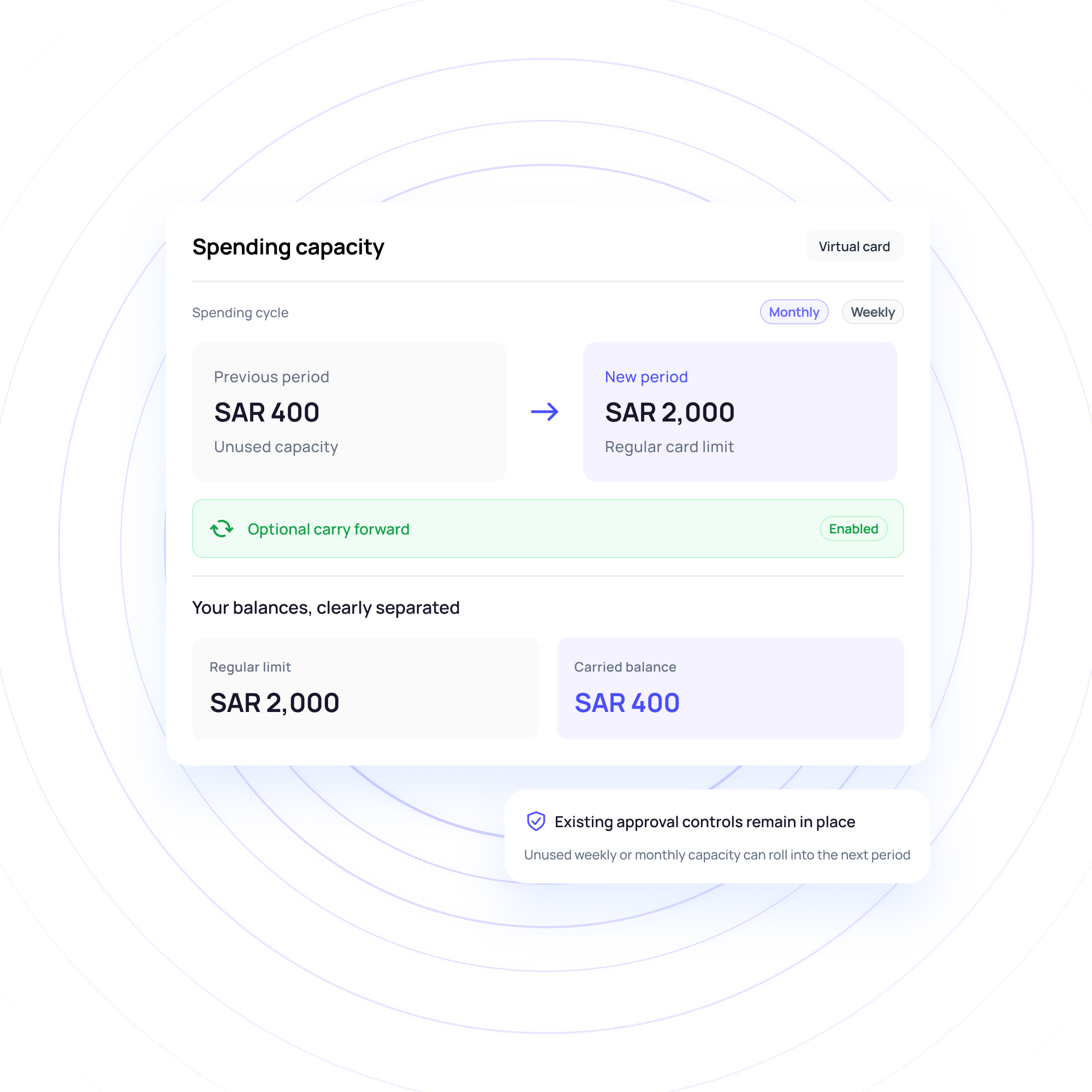
Set card limits around spending needs. With optional carry forward, unused balances can roll into the next period without requiring a fresh top-up request.
Card requests with built-in approvals
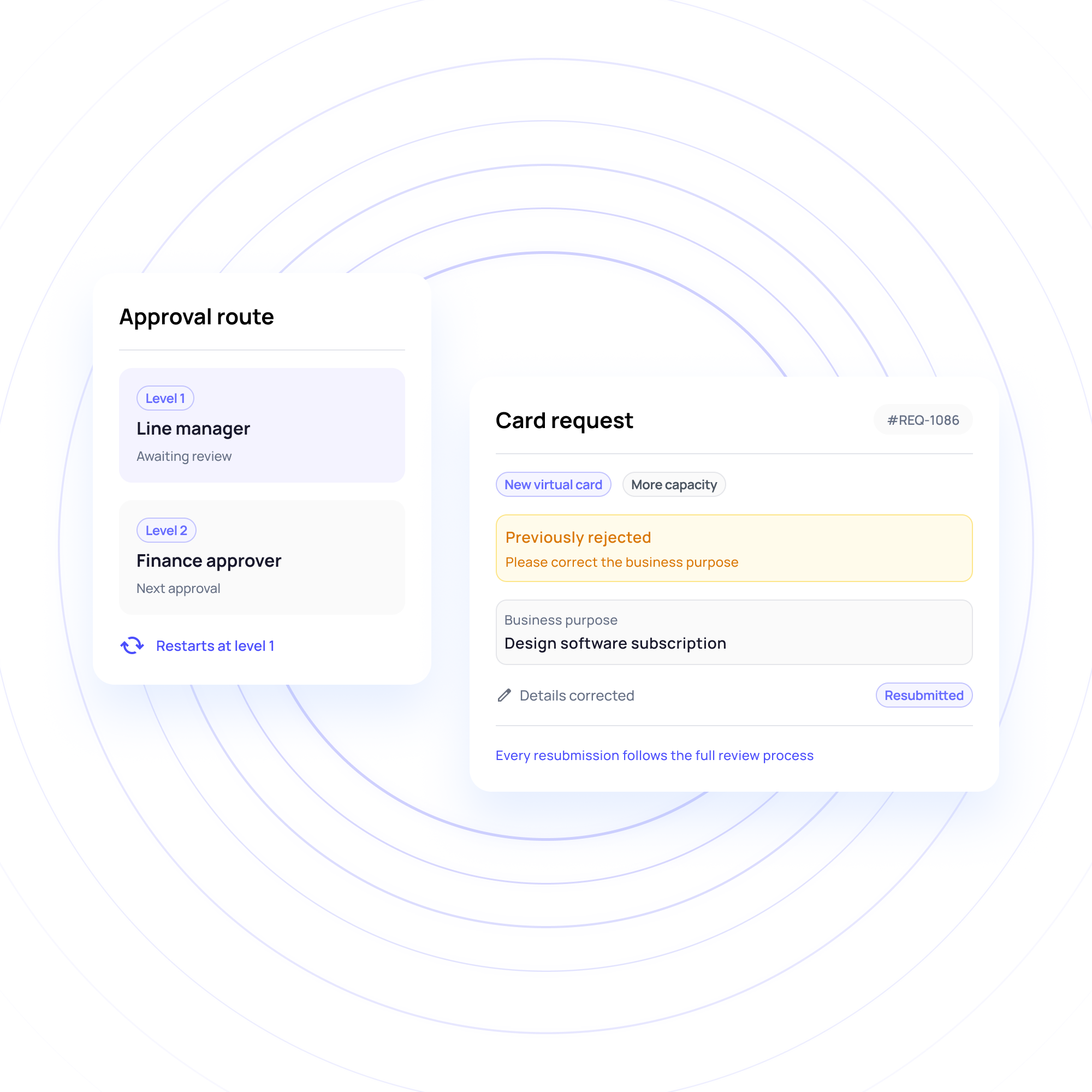
Employees can request cards or additional funds through an approval workflow. Rejected requests can be corrected and resubmitted without starting over.
Spend locally and internationally
Use virtual cards for eligible business purchases in Saudi riyals and international transactions, while keeping card activity visible to finance.
Accounting that follows the transaction
Automatically categorize card transactions using accounting rules and transfer organized expense records into your accounting software.
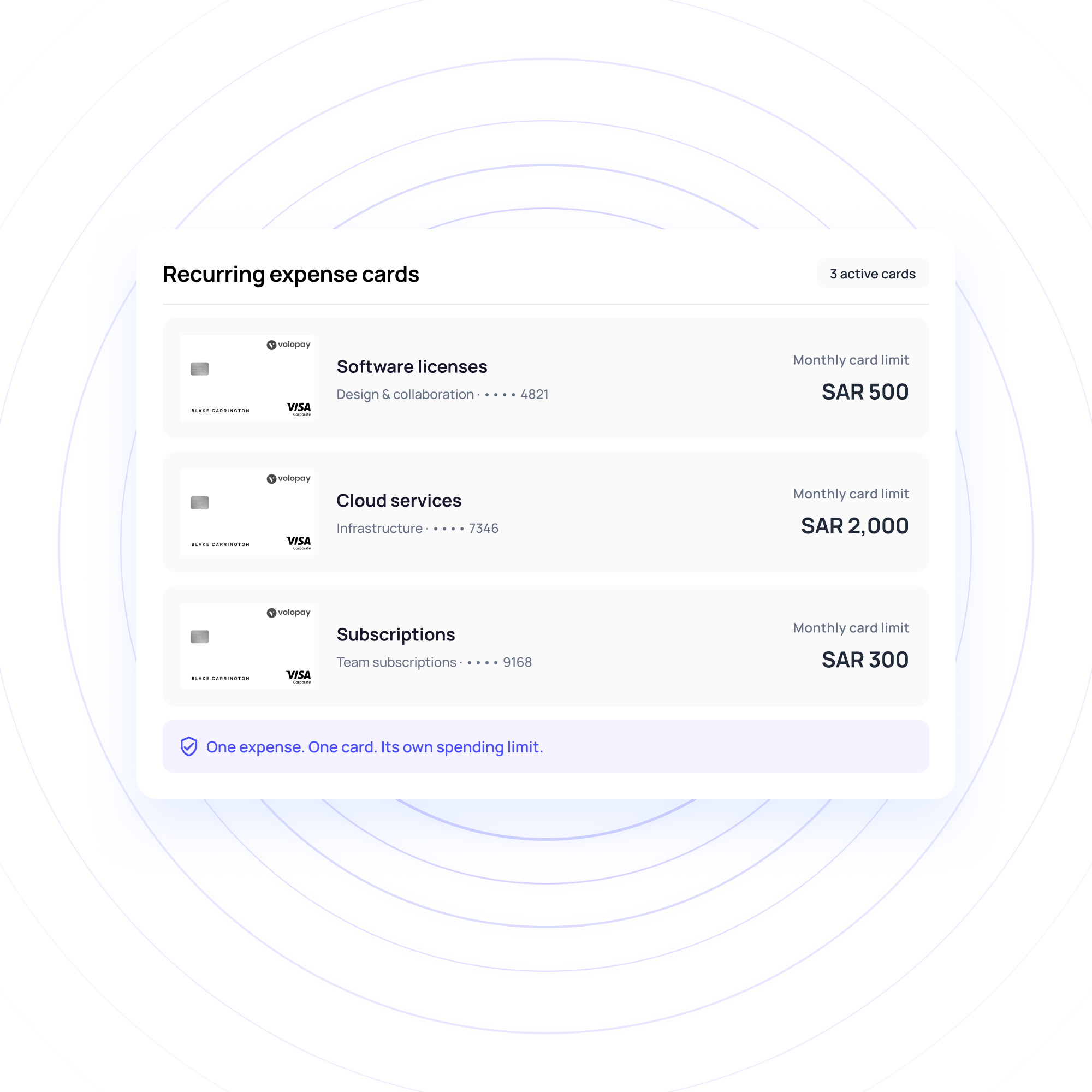
Give every recurring expense its own card
Create dedicated virtual cards for subscriptions, software licenses, cloud services, and regular business purchases. With a separate spending limit for each card, finance can distinguish individual commitments without untangling transactions from a shared payment method.
Let spending capacity follow business needs
Not every month carries the same expenses. Volopay's optional carry-forward feature lets unused weekly or monthly card balances roll into the next period, alongside the new period's limit. Cardholders can see the regular limit and carried balance separately, while existing approval controls remain in place.
Simplify card requests and approvals
Employees can request new virtual cards or additional spending capacity through established approval workflows. If a request is rejected, they can correct the details and resubmit it. Every resubmission starts from the first approval level, preserving the full review process.
Perfect virtual card solution for your business!
Engineered for controlled spending
Spend from allocated company funds
Volopay virtual cards use company funds allocated for business spending. Finance can set card limits before purchases occur, giving employees access to approved spending capacity without relying on personal credit.
Maintain control as spending requirements change
Adjust card limits as business requirements change. For eligible weekly and monthly cards, carry forward can preserve unused spending capacity for periods with higher expenses, subject to available funds and applicable budget controls.
Reduce the work behind expense accounting
Automated accounting rules classify card transactions according to configured categories. Finance can export structured records or use supported accounting integrations, reducing repetitive coding and reconciliation preparation.
Keep virtual card activity organized and accountable
Use dedicated virtual cards to distinguish employee purchases, ongoing services, and other business costs. Centralized transaction visibility makes it easier for finance to review spending and identify the purpose of each card.
Virtual cards for the way Saudi businesses operate
Allocate separate virtual corporate cards to SaaS subscriptions, cloud infrastructure, and ongoing digital services. Set individual spending limits so recurring charges remain visible and easier to manage.
Create dedicated virtual cards for different advertising platforms or campaigns. Separate limits help finance review marketing expenditure and distinguish individual spending commitments.
Equip employees with virtual cards for eligible travel bookings, accommodation, and work-related purchases. Manage company-funded expenses without relying on personal payment methods.
Use dedicated virtual cards for suppliers and service providers that accept card payments. Keep card-based purchases separate and assign spending limits according to approved requirements.
Issue virtual cards for employees working across departments, projects, and locations. Manage card limits centrally while keeping purchases associated with their designated cardholders.
Conventional business payment arrangements vs. Volopay virtual cards
Conventional payment arrangements | Volopay virtual cards |
|---|---|
Multiple employees or subscriptions may depend on shared cards or personal payment methods. | Create unlimited dedicated virtual cards for individual spending needs. |
Shared card limits can make it harder to distinguish separate spending allocations. | Assign individual limits to cards before purchases take place. |
Fixed periodic limits may require adjustments when spending changes between periods. | Optional carry forward preserves unused weekly or monthly balances for subsequent periods. |
Employees may need to recreate card or funding requests after rejection, depending on the process used. | Edit and resubmit rejected card or top-up requests through the existing approval chain. |
Multiple subscriptions on the same card may require additional work to identify individual costs. | Create dedicated virtual cards for subscriptions and other recurring purchases. |
Transactions may require manual categorization and preparation before posting. | Use accounting rules to categorize transactions and transfer organized records to accounting software. |
They loved Volopay, you will too
Bring Volopay to your business
Get started now
FAQs
Volopay lets businesses issue dedicated virtual cards for employees, subscriptions, and other expenses. Finance teams can set individual spending limits, manage card requests through approval workflows, and automate transaction categorization. This provides clearer visibility over purchases while reducing manual expense management and accounting work.
Yes. Volopay allows businesses to create unlimited virtual cards for different spending needs. You can assign separate cards to employees, subscriptions, or recurring purchases, each with its own spending limit. This helps finance maintain clearer expense ownership without relying on shared payment cards.
Volopay virtual cards help protect company funds through individual spending limits and controlled approval workflows. Finance teams can manage card allocations, review transactions, and maintain spending oversight. Dedicated cards also help separate purchases, reducing exposure associated with using one payment card across multiple vendors.
Yes. Authorized admins and card managers can issue virtual cards with details available immediately. Employee-initiated requests follow the company's configured approval workflow, with cards generated after approval. Rejected requests can also be corrected and resubmitted without completing the entire request again from scratch.
Yes. You can assign and update individual card limits based on spending requirements. Volopay also offers optional carry forward for weekly and monthly cards, allowing unused spending capacity to roll into the next period. Changes follow configured approvals, and available funds still limit spending.
Consider card issuance flexibility, spending controls, approval workflows, local and international payment support, and accounting integration. Look for features that reduce manual work without weakening financial oversight. Volopay combines unlimited virtual cards, configurable limits, approval workflows, and automated expense categorization in one platform.