10 Rippling alternatives for expense management
Rippling is a strong choice for businesses that want to manage HR, IT, payroll, and employee expenses from one platform.
However, companies that need deeper travel management, stronger spend controls, or more flexible finance features may find it limiting. Many alternatives offer broader expense automation, better travel booking, and more advanced reporting. This article compares the best Rippling alternatives for travel and expense management in 2026.










REVIEWED BY

Akanksh Muniyappa
Head of Product
WRITTEN BY

Alifiya Rathod
Content Writer
Quick summary of the best Rippling alternatives
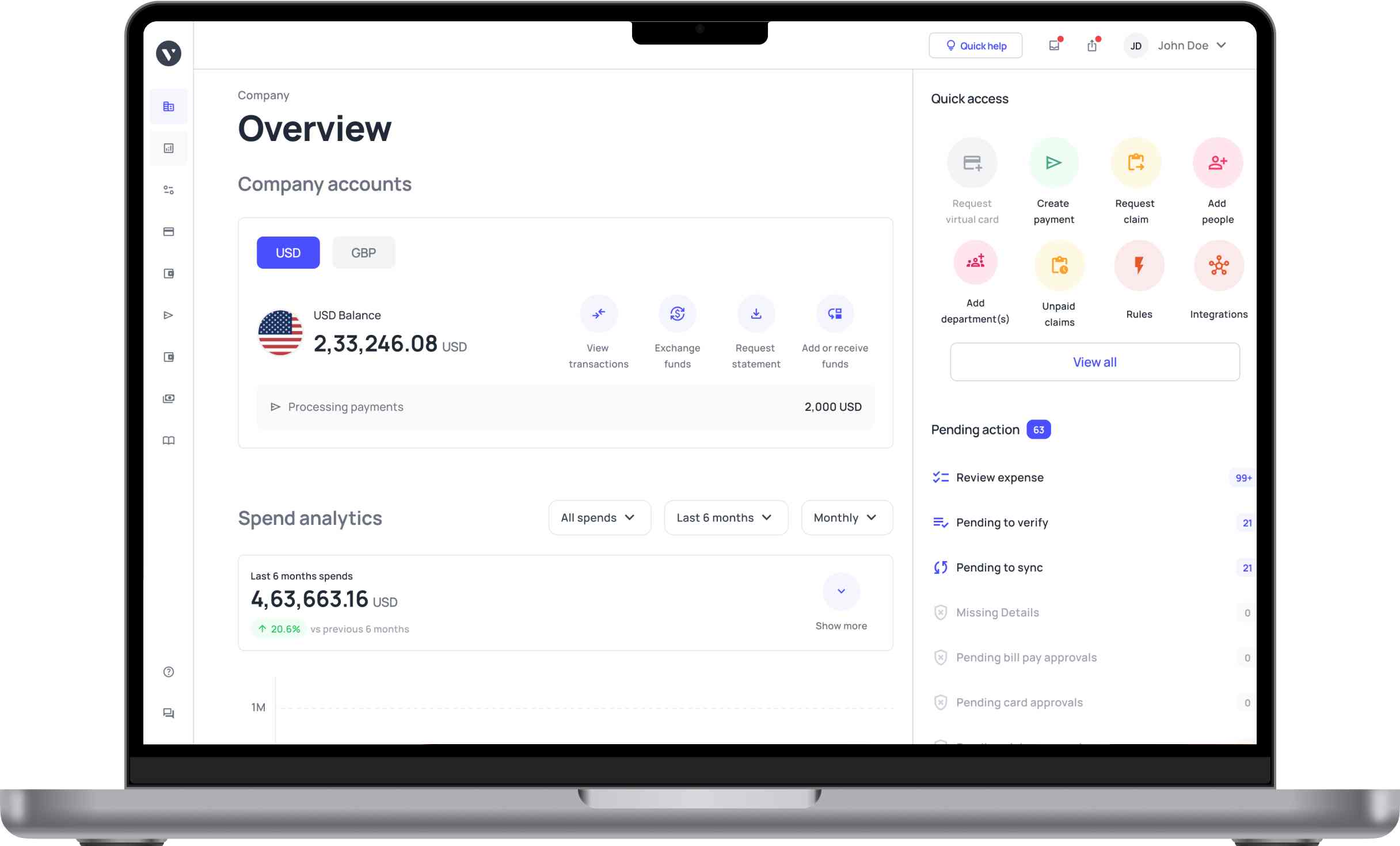
● Volopay: Best for all-in-one travel, expense, and corporate card management
● Brex: Best for modern corporate cards with built-in expense controls
● SAP Concur: Best for enterprise-grade travel and expense management
● Ramp: Best for cost control with automation and savings insights
● BILL: Best for streamlined accounts payable and expense workflows
● Expensify: Best for simple receipt tracking and reimbursements
● Paylocity: Best for integrated payroll, procurement, and expense management
● Zoho Expense: Best for customizable and budget-friendly expense tracking
● Gusto: Best for payroll-focused HR and employee expense management
● Deel: Best for global payroll, compliance, and contractor management
| Tool | Best for | Fast reimbursements | Flexible approval workflows | Integrated travel booking | Multi-currency support | Global card access |
|---|---|---|---|---|---|---|
Volopay | Global teams, SMBs & mid-market | Yes | Yes | Yes | Yes | Yes |
Brex | Startups & tech companies | Yes | limited customization tiers | limited travel focus | Yes | limited global issuance |
SAP Concur | Large enterprises | Moderate processing speed | Yes | Yes | Yes | limited card issuing |
Ramp | Finance automation-focused teams | Yes | limited multi-entity workflows | limited travel ecosystem | limited global coverage | Yes |
BILL | AP-focused businesses | limited reimbursement focus | limited workflow depth | No native travel booking | Yes | Limited card features |
Expensify | Small teams & freelancers | Yes | limited advanced controls | Limited travel capabilities | Moderate global support | Limited card options |
Paylocity | Mid-sized US businesses with HR + payroll focus | Basic reimbursement support | Yes | No native travel feature | Limited global capabilities | No corporate card support |
Zoho Expense | Budget-conscious SMBs | Moderate reimbursement speed | Yes | Limited booking integrations | Yes | Limited card support |
Gusto | Small businesses with simple payroll and expenses | Yes | Basic workflow customization | No travel booking feature | US-focused payroll system | No corporate card offering |
Deel | Global teams managing international payroll and contractors | Yes | Yes | No travel booking feature | Yes | Limited card availability |
Get your team working with Volopay
Best overall
1. Volopay
Best for: You benefit most if you run a startup, SMB, or mid-market business needing complete visibility and control over expenses, travel spending, and corporate cards across distributed teams globally.
Solutions: Volopay supports industries like SaaS, e-commerce, logistics, and professional services, where you manage frequent travel, vendor payments, and employee expenses. It is great for companies requiring centralized tracking, automation, and policy-driven controls.
Integrations: Volopay connects with accounting systems like QuickBooks, Xero, NetSuite, and Tally, along with API integrations that help you sync financial data across your existing tools seamlessly.
Best for payroll teams
2. Paylocity
Best for: This platform suits mid-sized businesses needing combined HR, payroll, and expense management. You benefit if you want centralized data, streamlined workflows, and better visibility across employee operations and financial processes.
Solutions: It is used across industries like healthcare, retail, finance, and professional services. You can manage workforce operations, payroll, and expenses while improving compliance and coordination across departments.
Integrations: It supports integrations with various HR, accounting, and business tools. You can connect systems through APIs to streamline workflows and ensure consistent data synchronization.
Pricing: It follows a custom pricing model based on features and company size. Costs vary depending on the modules selected, making it important to request a tailored quote.
3. Gusto
Best for: This platform suits small businesses and startups needing payroll, basic expense tracking, and employee management without complex systems or heavy administrative requirements.
Solutions: It is used across industries like retail, technology, and professional services. Businesses manage payroll, benefits, and simple expense workflows efficiently.
Integrations: It integrates with tools like QuickBooks, Xero, and third-party apps. This helps streamline accounting, payroll syncing, and overall business operations effectively.
Pricing: It offers tiered pricing based on features and employee count, and even a plan if you work as a ‘solopreneur’. Costs increase as you add advanced payroll, benefits, and additional business management capabilities.
Best for SMBs
4. Expensify
Best for: This platform suits small to mid-sized businesses and growing teams. You can rely on it for simple expense tracking, receipt management, and reimbursements without dealing with complex configurations or heavy administrative overhead.
Solutions: It is used across industries like technology, consulting, media, and professional services. You can manage employee expenses, streamline reimbursements, and maintain clear visibility into spending across teams, projects, and departments.
Integrations: It integrates with tools like QuickBooks, Xero, NetSuite, and Uber. You can streamline accounting workflows and ensure accurate syncing of expense and financial data.
Pricing: It offers tiered pricing plans based on features and usage. You may see costs increase with additional users, premium features, or advanced capabilities for scaling operations.
5. Brex
Best for: You benefit most if you run a startup or scaling company needing modern corporate cards, automated expense tracking, and strong spend controls tailored for fast-growing, venture-backed, or tech-driven teams.
Solutions: It serves industries like SaaS, fintech, e-commerce, and startups where you need streamlined expense management, travel spending visibility, and automated controls to manage distributed teams and vendor payments efficiently.
Integrations: It integrates with tools like QuickBooks, NetSuite, Xero, and other finance systems for streamlined accounting
Pricing: You can choose between a free Essentials plan at $0 per user per month, a Premium plan at $12 per user per month, or a custom-priced Enterprise plan, with higher tiers unlocking advanced controls, automation, and global payment capabilities.
Best for enterprises
6. SAP Concur
Best for: Mid-sized to large enterprises with complex travel policies, global teams, and strict compliance needs. These organisations require centralized control, audit trails, and scalable expense management workflows.
Solutions: You can use it across industries like finance, healthcare, manufacturing, technology, and consulting, where travel-heavy operations, regulatory compliance, and multi-entity expense tracking require structured workflows and centralized visibility into spending.
Integrations: You can connect with ERP, HR, CRM, and accounting systems like QuickBooks, Xero, and Sage through prebuilt connectors and APIs for seamless data synchronization.
Pricing: You typically receive custom, quote-based pricing depending on company size, features, and usage, which can scale significantly for enterprises with high transaction volumes and advanced requirements.
Best for global hiring & remote teams
7. Deel
Best for: This platform suits businesses managing global teams and remote workers. It works well if you need compliant hiring, payroll, and expense reimbursements across multiple countries efficiently.
Solutions: It is used across industries like technology, finance, and consulting. Companies manage global hiring, payroll, compliance, and contractor payments through a single centralized platform.
Integrations: It integrates with accounting and expense tools like QuickBooks, Xero, and Expensify. You can streamline financial workflows and sync payroll data across systems.
Pricing: It follows a modular pricing model based on services used. Plans start around per employee or contractor monthly, scaling with payroll, compliance, and global workforce management needs.
Best for mid-sized companies
8. Ramp
Best for: You benefit most if you run a startup or a growing business. If you are seeking cost control, automated expense tracking, and real-time visibility without complex enterprise software or heavy implementation requirements, Ramp is a Rippling alternative that you might want to consider.
Solutions: You can use it across technology, e-commerce, marketing, and professional services industries. It suits teams needing streamlined expense management, corporate cards, and insights to optimize company spending efficiently.
Integrations: You can connect with tools like QuickBooks, Xero, NetSuite, and Slack. This helps you automate data syncing and maintain accurate financial records.
Pricing: You typically use it for free with no subscription fees. Some advanced services or enterprise-level features may involve additional custom pricing.
9. BILL
Best for: You benefit most if you run a small to mid-sized business. It supports teams needing simple accounts payable automation, expense tracking, and efficient payment workflows without complex enterprise setups or long implementation timelines.
Solutions: It is used across industries like accounting, retail, healthcare, and professional services. Businesses rely on it to manage vendor payments, approvals, and expenses while improving operational efficiency and financial control.
Integrations: It integrates with tools like QuickBooks, Xero, NetSuite, and Sage. This ensures smooth data synchronization and supports streamlined accounting and financial operations.
Pricing: You typically choose from tiered subscription plans (Basic, Team & Corporate) based on features. Costs can increase as you scale, especially with higher transaction volumes or advanced automation needs. As for an Enterprise plan, you may receive custom pricing.
Best for European SMBs
10. Zoho Expense
Best for: This platform suits small to mid-sized businesses and startups. You benefit if you need affordable expense management with automation. It also offers policy controls and easy deployment without complex setup requirements.
Solutions: It is used across industries like technology, consulting, education, and retail. You can manage employee expenses and automate reporting. It also helps maintain compliance and improve visibility into company spending.
Integrations: It integrates with Zoho apps, QuickBooks, Xero, and G-Suite. You can streamline workflows easily. It also ensures smooth syncing of financial and operational data.
Pricing: It offers a free plan for basic usage. Paid plans are affordable and flexible. Costs scale as your business grows and requires more advanced features.
What is the best Rippling alternative in 2026?
When choosing a Rippling alternative, businesses should consider factors such as travel management, expense automation, corporate cards, approval workflows, multi-currency support, and global coverage.
The right platform will depend on your company size, budget, travel needs, and the level of financial control and customization your finance team requires.
How to choose the right Rippling alternative for your business
Company size
Choosing a platform that matches your company size helps ensure smoother operations and long-term scalability. The right fit improves efficiency, reduces manual work, and supports your business as teams and processes grow. Smaller teams prefer simple tools with quick setup, while larger organizations require scalable platforms. Features to look for include advanced controls, multi-entity support, and structured workflows to manage growing operational complexity.
Budget
Your budget determines not only affordability but also the long-term value you get from the platform. Evaluating costs carefully helps avoid overspending while ensuring you still gain the automation and features your business needs. Some platforms offer free or low-cost plans, while others require higher investment. You should evaluate long-term value, including automation, scalability, and hidden costs that may increase as your usage grows.
Feature requirements
Understanding your feature requirements helps you choose a platform that supports your daily workflows without added complexity. The right features improve productivity, streamline approvals, and reduce the need for additional software. Look for capabilities like automated expense tracking, real-time reporting, policy controls, and integrations. Missing essential features can create inefficiencies and require additional tools to fill operational gaps.
Complex setup
A platform with a simple setup process helps teams start using the system faster with minimal disruption. Easier onboarding reduces training time, improves adoption, and allows businesses to see value more quickly. Some platforms involve complex implementation and longer onboarding timelines. If your team prefers quick deployment, choose a solution with an intuitive design and minimal setup requirements.
Limited travel booking features
Built-in travel booking features help businesses manage trips, expenses, and policy compliance in one place. Choosing a platform with integrated travel management improves visibility and creates a smoother experience for employees. Not all tools offer built-in travel booking capabilities. If travel management is important, consider platforms that combine booking and expense tracking.
Limited customization for approval workflows
Flexible approval workflows help businesses maintain control while matching internal processes and reporting structures. Customizable approvals improve efficiency, reduce delays, and ensure spending policies are followed consistently. Some tools offer limited customization, which can restrict flexibility. Choose a platform that allows you to tailor approval processes based on roles, departments, or spending thresholds to match your internal structure.
Corporate card integration gaps
Strong corporate card integrations help businesses track expenses in real time and maintain better control over company spending. Seamless syncing reduces manual work, improves accuracy, and simplifies reconciliation for finance teams. Some tools have limited integrations or delayed syncing. You should look for platforms that offer seamless card integration to improve visibility, control spending, and reduce manual reconciliation efforts.
FAQs
Companies often seek alternatives because expense management may feel limited within Rippling. They look for tools offering better automation, stronger travel features, improved reporting, and more flexibility. It brings ease for finance teams managing complex workflows.
Volopay stands out with a smooth, mobile-first submission experience. Employees can scan receipts and submit them quickly. Tools like Expensify and Zoho Expense also simplify submissions with automation and minimal manual input.
Volopay is a strong choice for automation with real-time tracking and smart workflows. Platforms like Ramp and SAP Concur also offer automated categorization, policy checks, and reporting for efficient expense management.
Yes, some tools like Ramp and Zoho Expense offer free plans. These options provide basic expense tracking, reporting, and automation features, making them suitable for startups or small businesses with limited budgets.
Yes, most platforms support data migration through imports or integrations. You can transfer historical expense records, though the process depends on tool compatibility and may require careful planning to ensure data accuracy.